
articles/Lighting/lighting-masterclass-page2

Stuart Wood Lighting Masterclass - part 2 of 1 2 3

by Stuart Wood Published 01/12/2014

wood-cilla-03.jpg

As I have explained in previous articles, that due to my years shooting transparency and Polaroid and at a time when Photoshop was not even an option, in other words I had no other choice other than learn to achieve exactly what I wanted in camera without the safety net of retouching, I am able to do most of what I want digitally at the time of shooting.

While this is quite a complicated lighting set-up, the image that you actually see here is straight from camera and has not been subject to long and time-consuming retouching later.

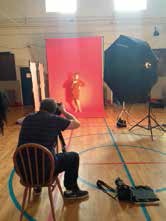
First of all I used my Elinchrom fresnel spot as the main light to achieve my shadow of Sheridan on the background, while still making sure that this specular light source was still creating a very complimentary light on her. There would obviously be no point in creating the perfect shadow while rendering an unflattering light upon our star! After this was achieved I brought my large Octa light directly behind the spot light and reduced the power of the Octa until it simply filled in the shadow areas.

This was done because the main light would only render a contrasty direct light on Sheridan and the shadow on the background behind would be completely black and merge into her darker edge making it either difficult or impossible to separate the two.


wood-cilla-04.jpg

As well as this, the spot circle effect around Sheridan would also be much more contrasty, rendering the areas of background outside the spot virtually black and while I wanted the spotlight to be nicely defined, I did not want it to lose too much detail. As I like to try to create an almost 3D effect in a 2D image, this would not do, so I needed to soften the spot effect and the large Octa was perfect for this. Another consideration was that I wanted the detail to be precise and did not want cross shadows from the Octa fill light, so it was placed directly behind the fresnel spot. It was this image that was eventually used for the main DVD cover for the series.

Another picture that we were keen to try was an updated version of an old Cilla album cover, where she is surrounded by daffodils. So my friend and florist John Preston was duly dispatched to Liverpool with a van full of daffs and he worked hard in a separate area of the studio, to beautifully arrange the flowers for Sheridan to lie in. We then moved a table above her so that I had an elevated platform and recreated the image. The lighting for this was a simple 'copy lighting' set-up of 2x Elinchrom 500 studio heads with 1-metre square soft-boxes. One slight refinement was to move the lights further up the picture so that it appeared that Sheridan was being lit from above and making sure that the shadows would fall naturally in the finished image.

What a fabulous project this was!


Please Note:
There is more than one page for this Article.
You are currently on page 2 Contact Stuart Wood

1st Published 01/12/2014
last update 09/12/2022 14:55:54

More Lighting Articles


There are 0 days to get ready for The Society of Photographers Convention and Trade Show at The Novotel London West, Hammersmith ...
which starts on Wednesday 14th January 2026

Dec 14335Professional Image Maker

Fast and intuitive, PortraitPro intelligently enhances every aspect of a portrait for beautiful results. Expires: Mon, 26 Jul 2001 05:00:00 GMT Pragma: no-cache Cache-Control: no-cache, must-revalidate Content-type: text/html SWPP Right Column Banner Max 200 pix wide Control Panel 1.7

SWPP Right Col Banner Max 200 pix wide Control Panel 1.7

Error:


Script Error

Error:

Can't verify file locking - aborting.

Make sure the following has been observed:

Unix Servers:
  • rightcolban.cgi is writable by this script
  • If a file locking problem, make sure the directory this script resides in is writable. Note, the directory does not have to be writable for the script to write to files, only for it to create files. File creation is required for proper file locking.
Windows NT systems:
  • rightcolban.cgi must be writable and accessible by the script
  • banner.cgi must be able to write to files and create files
  • On some NT systems, the variable near the top of banner.cgi must be set. It is currently set as follows:
      $main::rightcolban_path = "rightcolban";
    Note that under most systems, "." is fine. This specifies that it is set to the current directory. However, some NT systems require the full server path. Contact your system administrator to find the full path to your cgi-bin directory.
If you still have trouble, contact Banner@linc2u.com and I will attempt to help.

Software

Main Menu | Add Banners. Log Out
2000 Software

Header Banner root pages
Right Column Banner root pages - ACTIVE
Sponsor Banner root pages

Expires: Mon, 26 Jul 2001 05:00:00 GMT Pragma: no-cache Cache-Control: no-cache, must-revalidate Content-type: text/html SWPP Right Column Banner Max 200 pix wide Control Panel 1.7

SWPP Right Col Banner Max 200 pix wide Control Panel 1.7

Error:


Script Error

Error:

Can't clean lock file - aborting.

Make sure the following has been observed:

Unix Servers:
  • rightcolban.cgi is writable by this script
  • If a file locking problem, make sure the directory this script resides in is writable. Note, the directory does not have to be writable for the script to write to files, only for it to create files. File creation is required for proper file locking.
Windows NT systems:
  • rightcolban.cgi must be writable and accessible by the script
  • banner.cgi must be able to write to files and create files
  • On some NT systems, the variable near the top of banner.cgi must be set. It is currently set as follows:
      $main::rightcolban_path = "rightcolban";
    Note that under most systems, "." is fine. This specifies that it is set to the current directory. However, some NT systems require the full server path. Contact your system administrator to find the full path to your cgi-bin directory.
If you still have trouble, contact Banner@linc2u.com and I will attempt to help.

Software

Main Menu | Add Banners. Log Out
2000 Software

Header Banner root pages
Right Column Banner root pages - ACTIVE
Sponsor Banner root pages

Expires: Mon, 26 Jul 2001 05:00:00 GMT Pragma: no-cache Cache-Control: no-cache, must-revalidate Content-type: text/html SWPP Right Column Banner Max 200 pix wide Control Panel 1.7

SWPP Right Col Banner Max 200 pix wide Control Panel 1.7

Error:


Script Error

Error:

Can't verify lock file for cleanup - aborting.

Make sure the following has been observed:

Unix Servers:
  • rightcolban.cgi is writable by this script
  • If a file locking problem, make sure the directory this script resides in is writable. Note, the directory does not have to be writable for the script to write to files, only for it to create files. File creation is required for proper file locking.
Windows NT systems:
  • rightcolban.cgi must be writable and accessible by the script
  • banner.cgi must be able to write to files and create files
  • On some NT systems, the variable near the top of banner.cgi must be set. It is currently set as follows:
      $main::rightcolban_path = "rightcolban";
    Note that under most systems, "." is fine. This specifies that it is set to the current directory. However, some NT systems require the full server path. Contact your system administrator to find the full path to your cgi-bin directory.
If you still have trouble, contact Banner@linc2u.com and I will attempt to help.

Software

Main Menu | Add Banners. Log Out
2000 Software

Header Banner root pages
Right Column Banner root pages - ACTIVE
Sponsor Banner root pages


Update cookies preferences