
articles/Cameras/hitchhicker-page3

The Hitchhiker's Guide to...Digital Pictures - part 3 of 1 2 3

by Tom Lee Published 01/02/2001

hitchhicker-01.jpg

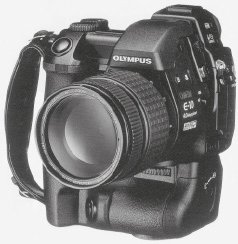
Compared with the Nikon (2.74mp), Fiji (3.1mp) and Canon (3.1mp) the E10 is already looking good value for money. The image ratio of the chip is 1:1.33, equivalent to a 6x4.5 medium format camera (not 35mm) making the image composition a familiar operation to most of us.

The Verdict.....

The proof of the pudding is however, what your customers think. I have had the opportunity to use it on a couple of jobs so far, including backup for a wedding.

My clients knew I was using digital capture as well as medium format equipment. They had great fun trying to find out which pictures were taken on which camera, without success. In this respect the camera has already passed its sternest test. If a discerning client cannot tell a 10"x8" digital print from a medium format print, even when they know that both are there to be scrutinised, then who are we to whinge.

The camera works equally well in the studio, where much larger images would be expected to be produced.


I have made enlargements up to 20"x24" (I don't get clients with bigger wallets, or walls) with no apparent loss of quality, either in definition or colour fidelity, although more care is required in choosing camera settings.

I haven't covered all the technical aspects of the camera, because they will probably only be of interest to other geeks like myself. I have used the Camedia E10 just as I would any other camera, on real jobs, and passed the "Client Test". The problem with the electronic revolution is that it changes so rapidly. Cutting edge technology today is tomorrows Zenith, has anybody tried to buy an Epson printer lately? Just when you think you've got the latest model, two more advanced machines appear on the shelf.

I have chosen to make a purchase at what I consider to be the right balance of quality and price. Two or three years down the line it may be time to change again, cameras will undoubtedly be bigger and better, and I don't want to be left with expensive scrap. Whilst the other cameras may have more whistles and bells, they don't produce the goods any better. When was the last time you took a wedding picture at 1/4000th of a second at ISO 1600? Finally, if there are any inquisitive geeks out there, I will be only too pleased to discuss algorithms over a pint or two.



Please Note:
There is more than one page for this Article.
You are currently on page 3 Contact Tom Lee

1st Published 01/02/2001
last update 09/12/2022 14:54:58

More Cameras Articles


Feb 0132Professional Image Maker

Fast and intuitive, PortraitPro intelligently enhances every aspect of a portrait for beautiful results. Expires: Mon, 26 Jul 2001 05:00:00 GMT Pragma: no-cache Cache-Control: no-cache, must-revalidate Content-type: text/html SWPP Right Column Banner Max 200 pix wide Control Panel 1.7

SWPP Right Col Banner Max 200 pix wide Control Panel 1.7

Error:


Script Error

Error:

Can't verify file locking - aborting.

Make sure the following has been observed:

Unix Servers:
  • rightcolban.cgi is writable by this script
  • If a file locking problem, make sure the directory this script resides in is writable. Note, the directory does not have to be writable for the script to write to files, only for it to create files. File creation is required for proper file locking.
Windows NT systems:
  • rightcolban.cgi must be writable and accessible by the script
  • banner.cgi must be able to write to files and create files
  • On some NT systems, the variable near the top of banner.cgi must be set. It is currently set as follows:
      $main::rightcolban_path = "rightcolban";
    Note that under most systems, "." is fine. This specifies that it is set to the current directory. However, some NT systems require the full server path. Contact your system administrator to find the full path to your cgi-bin directory.
If you still have trouble, contact Banner@linc2u.com and I will attempt to help.

Software

Main Menu | Add Banners. Log Out
2000 Software

Header Banner root pages
Right Column Banner root pages - ACTIVE
Sponsor Banner root pages

Expires: Mon, 26 Jul 2001 05:00:00 GMT Pragma: no-cache Cache-Control: no-cache, must-revalidate Content-type: text/html SWPP Right Column Banner Max 200 pix wide Control Panel 1.7

SWPP Right Col Banner Max 200 pix wide Control Panel 1.7

Error:


Script Error

Error:

Can't verify file locking - aborting.

Make sure the following has been observed:

Unix Servers:
  • rightcolban.cgi is writable by this script
  • If a file locking problem, make sure the directory this script resides in is writable. Note, the directory does not have to be writable for the script to write to files, only for it to create files. File creation is required for proper file locking.
Windows NT systems:
  • rightcolban.cgi must be writable and accessible by the script
  • banner.cgi must be able to write to files and create files
  • On some NT systems, the variable near the top of banner.cgi must be set. It is currently set as follows:
      $main::rightcolban_path = "rightcolban";
    Note that under most systems, "." is fine. This specifies that it is set to the current directory. However, some NT systems require the full server path. Contact your system administrator to find the full path to your cgi-bin directory.
If you still have trouble, contact Banner@linc2u.com and I will attempt to help.

Software

Main Menu | Add Banners. Log Out
2000 Software

Header Banner root pages
Right Column Banner root pages - ACTIVE
Sponsor Banner root pages

Expires: Mon, 26 Jul 2001 05:00:00 GMT Pragma: no-cache Cache-Control: no-cache, must-revalidate Content-type: text/html SWPP Right Column Banner Max 200 pix wide Control Panel 1.7

SWPP Right Col Banner Max 200 pix wide Control Panel 1.7

Error:


Script Error

Error:

Can't clean lock file - aborting.

Make sure the following has been observed:

Unix Servers:
  • rightcolban.cgi is writable by this script
  • If a file locking problem, make sure the directory this script resides in is writable. Note, the directory does not have to be writable for the script to write to files, only for it to create files. File creation is required for proper file locking.
Windows NT systems:
  • rightcolban.cgi must be writable and accessible by the script
  • banner.cgi must be able to write to files and create files
  • On some NT systems, the variable near the top of banner.cgi must be set. It is currently set as follows:
      $main::rightcolban_path = "rightcolban";
    Note that under most systems, "." is fine. This specifies that it is set to the current directory. However, some NT systems require the full server path. Contact your system administrator to find the full path to your cgi-bin directory.
If you still have trouble, contact Banner@linc2u.com and I will attempt to help.

Software

Main Menu | Add Banners. Log Out
2000 Software

Header Banner root pages
Right Column Banner root pages - ACTIVE
Sponsor Banner root pages

Expires: Mon, 26 Jul 2001 05:00:00 GMT Pragma: no-cache Cache-Control: no-cache, must-revalidate Content-type: text/html SWPP Right Column Banner Max 200 pix wide Control Panel 1.7

SWPP Right Col Banner Max 200 pix wide Control Panel 1.7

Error:


Script Error

Error:

Can't verify lock file for cleanup - aborting.

Make sure the following has been observed:

Unix Servers:
  • rightcolban.cgi is writable by this script
  • If a file locking problem, make sure the directory this script resides in is writable. Note, the directory does not have to be writable for the script to write to files, only for it to create files. File creation is required for proper file locking.
Windows NT systems:
  • rightcolban.cgi must be writable and accessible by the script
  • banner.cgi must be able to write to files and create files
  • On some NT systems, the variable near the top of banner.cgi must be set. It is currently set as follows:
      $main::rightcolban_path = "rightcolban";
    Note that under most systems, "." is fine. This specifies that it is set to the current directory. However, some NT systems require the full server path. Contact your system administrator to find the full path to your cgi-bin directory.
If you still have trouble, contact Banner@linc2u.com and I will attempt to help.

Software

Main Menu | Add Banners. Log Out
2000 Software

Header Banner root pages
Right Column Banner root pages - ACTIVE
Sponsor Banner root pages


Update cookies preferences