
articles/Paper/paper-spectrum-page9

The Great Paper Chase - Paper Spectrum Pinnacle Paper Range - part 9 of 1 2 3 4 5 6 7 8 9 10 11

by Mike McNamee Published 01/06/2015

spectrum11.jpg

Presentation Products
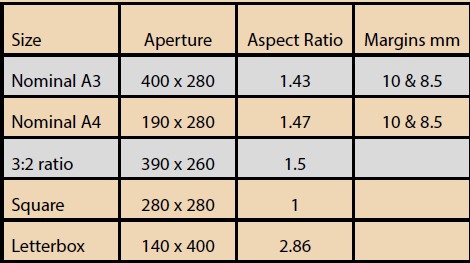
Paper Spectrum offer quite a range of presentation products which are a real boon to the print competitor. The enthusiast sector have standardised on a print size of 40cm by 50cm and Paper Spectrum supply pre-cut window matts, back boards, adhesive backboards and (in the kits) a few pieces of selected papers - a sort of entrants, starter pack! This size is also acceptable for The Societies' annual 16x20 competition. The following colours of window mounts are offered in this 50x40 format with the indicated aperture size (bespoke sizes can also be obtained):

Snow White Textured - A4 Standard Window, A3 Standard Window, A3 3:2 Ratio Window, Square 280x280mm Window, Letterbox/Panoramic 140x400mm Window
Antique White - A4 Standard Window, A3 Standard Window
Ice White - A4 Standard Window, A3 Standard Window
Hayseed - A4 Standard Window, A3 Standard Window
Black - A4 Standard Window, A3 Standard Window
Granite Grey - A4 Standard Window, A3 Standard Window
Charcoal Grey - A4 Standard Window, A3 Standard Window
Black with Black Core - A4 Standard Window, A3 Standard Window
White with Black Core - A4 Standard Window, A3 Standard Window

500x400mm backing boards are available as 1mm thick Grey board, or 1.5mm thick self-adhesive board

The following colours are available in boards:

Antique White
Ice White
Snow White Textured
Hayseed Textured
Black
Granite Grey
Charcoal Grey
Black with Black Core
White with Black Core
Hayseed Black Core

spectrum12.jpg

Taking a wide view
Paper Spectrum supply a range of both panoramic paper and pre-cut mounts in pan aspect ratio. We decided to cover the topic in more detail in the next issue, but if you cannot wait then visit the Paper Spectrum website!


Please Note:
There is more than one page for this Article.
You are currently on page 9 Contact Mike McNamee

1st Published 01/06/2015
last update 09/12/2022 14:57:23

More Paper Articles


Jun 15152Professional Image Maker

Fast and intuitive, PortraitPro intelligently enhances every aspect of a portrait for beautiful results. Expires: Mon, 26 Jul 2001 05:00:00 GMT Pragma: no-cache Cache-Control: no-cache, must-revalidate Content-type: text/html SWPP Right Column Banner Max 200 pix wide Control Panel 1.7

SWPP Right Col Banner Max 200 pix wide Control Panel 1.7

Error:


Script Error

Error:

Can't verify file locking - aborting.

Make sure the following has been observed:

Unix Servers:
  • rightcolban.cgi is writable by this script
  • If a file locking problem, make sure the directory this script resides in is writable. Note, the directory does not have to be writable for the script to write to files, only for it to create files. File creation is required for proper file locking.
Windows NT systems:
  • rightcolban.cgi must be writable and accessible by the script
  • banner.cgi must be able to write to files and create files
  • On some NT systems, the variable near the top of banner.cgi must be set. It is currently set as follows:
      $main::rightcolban_path = "rightcolban";
    Note that under most systems, "." is fine. This specifies that it is set to the current directory. However, some NT systems require the full server path. Contact your system administrator to find the full path to your cgi-bin directory.
If you still have trouble, contact Banner@linc2u.com and I will attempt to help.

Software

Main Menu | Add Banners. Log Out
2000 Software

Header Banner root pages
Right Column Banner root pages - ACTIVE
Sponsor Banner root pages

Expires: Mon, 26 Jul 2001 05:00:00 GMT Pragma: no-cache Cache-Control: no-cache, must-revalidate Content-type: text/html SWPP Right Column Banner Max 200 pix wide Control Panel 1.7

SWPP Right Col Banner Max 200 pix wide Control Panel 1.7

Error:


Script Error

Error:

Can't verify file locking - aborting.

Make sure the following has been observed:

Unix Servers:
  • rightcolban.cgi is writable by this script
  • If a file locking problem, make sure the directory this script resides in is writable. Note, the directory does not have to be writable for the script to write to files, only for it to create files. File creation is required for proper file locking.
Windows NT systems:
  • rightcolban.cgi must be writable and accessible by the script
  • banner.cgi must be able to write to files and create files
  • On some NT systems, the variable near the top of banner.cgi must be set. It is currently set as follows:
      $main::rightcolban_path = "rightcolban";
    Note that under most systems, "." is fine. This specifies that it is set to the current directory. However, some NT systems require the full server path. Contact your system administrator to find the full path to your cgi-bin directory.
If you still have trouble, contact Banner@linc2u.com and I will attempt to help.

Software

Main Menu | Add Banners. Log Out
2000 Software

Header Banner root pages
Right Column Banner root pages - ACTIVE
Sponsor Banner root pages

Expires: Mon, 26 Jul 2001 05:00:00 GMT Pragma: no-cache Cache-Control: no-cache, must-revalidate Content-type: text/html SWPP Right Column Banner Max 200 pix wide Control Panel 1.7

SWPP Right Col Banner Max 200 pix wide Control Panel 1.7

Error:


Script Error

Error:

Can't clean lock file - aborting.

Make sure the following has been observed:

Unix Servers:
  • rightcolban.cgi is writable by this script
  • If a file locking problem, make sure the directory this script resides in is writable. Note, the directory does not have to be writable for the script to write to files, only for it to create files. File creation is required for proper file locking.
Windows NT systems:
  • rightcolban.cgi must be writable and accessible by the script
  • banner.cgi must be able to write to files and create files
  • On some NT systems, the variable near the top of banner.cgi must be set. It is currently set as follows:
      $main::rightcolban_path = "rightcolban";
    Note that under most systems, "." is fine. This specifies that it is set to the current directory. However, some NT systems require the full server path. Contact your system administrator to find the full path to your cgi-bin directory.
If you still have trouble, contact Banner@linc2u.com and I will attempt to help.

Software

Main Menu | Add Banners. Log Out
2000 Software

Header Banner root pages
Right Column Banner root pages - ACTIVE
Sponsor Banner root pages

Expires: Mon, 26 Jul 2001 05:00:00 GMT Pragma: no-cache Cache-Control: no-cache, must-revalidate Content-type: text/html SWPP Right Column Banner Max 200 pix wide Control Panel 1.7

SWPP Right Col Banner Max 200 pix wide Control Panel 1.7

Error:


Script Error

Error:

Can't verify lock file for cleanup - aborting.

Make sure the following has been observed:

Unix Servers:
  • rightcolban.cgi is writable by this script
  • If a file locking problem, make sure the directory this script resides in is writable. Note, the directory does not have to be writable for the script to write to files, only for it to create files. File creation is required for proper file locking.
Windows NT systems:
  • rightcolban.cgi must be writable and accessible by the script
  • banner.cgi must be able to write to files and create files
  • On some NT systems, the variable near the top of banner.cgi must be set. It is currently set as follows:
      $main::rightcolban_path = "rightcolban";
    Note that under most systems, "." is fine. This specifies that it is set to the current directory. However, some NT systems require the full server path. Contact your system administrator to find the full path to your cgi-bin directory.
If you still have trouble, contact Banner@linc2u.com and I will attempt to help.

Software

Main Menu | Add Banners. Log Out
2000 Software

Header Banner root pages
Right Column Banner root pages - ACTIVE
Sponsor Banner root pages